Cafe & Coffee Shop POS Software
A cafe POS system that keeps the coffee queue moving: fast counter billing, drink modifiers, loyalty stamps, online and QR orders, and cost per cup. Works offline.
- AI-First Platform ✦
- Free Plan — No Credit Card
- 0 Downtime Setup
- Founder-Led Support
- AI-First Platform ✦
- Free Plan — No Credit Card
- 0 Downtime Setup
- Founder-Led Support
Purpose-built for cafe
Every Feature Your Cafe POS Needs
Parchika Cafe POS is built for the pace of a busy coffee counter. It handles quick billing, drink modifiers (size, hot or iced, milk, extra shot), loyalty stamps, online and QR orders, a barista display and recipe costing, so your queue keeps moving and you know the margin on every cup.
Quick Counter Billing
Touch-optimized screen with favorites grid for sub-5-second ordering.
Drink Modifiers
Size, temperature, milk type and extra shot modifiers — fully customizable.
Digital Loyalty Stamps
Digital stamp cards — buy 9 get 1 free — tracked per customer.
Kitchen Display
Barista screen shows each order with modifiers in real time.
Online Pre-Orders
Click-and-collect pre-orders with ready notification via WhatsApp.
Ingredient Tracking
Track coffee beans, milk and syrups with low-stock alerts.
Recipe Costing per Cup
Link each drink to its recipe so beans, milk and syrup are deducted per sale and you see the real cost of every cup.
QR Table Ordering
Seated guests scan a table QR code to browse the menu, order and pay without waiting at the counter.
Swiggy & Zomato Orders
Delivery orders arrive in the same queue as counter orders, so the barista sees everything in one place.
Offline Billing
Keep billing when the internet drops. Sales sync automatically when the connection returns.
WhatsApp & Digital Receipts
Send bills to the customer's phone instead of printing, and collect numbers for loyalty.
Multi-Cafe Management
Run several cafes or kiosks with one menu, central price changes and combined sales reports.
See it in action
See Parchika Cafe POS in Action
Real screens from the Parchika app, not mockups.
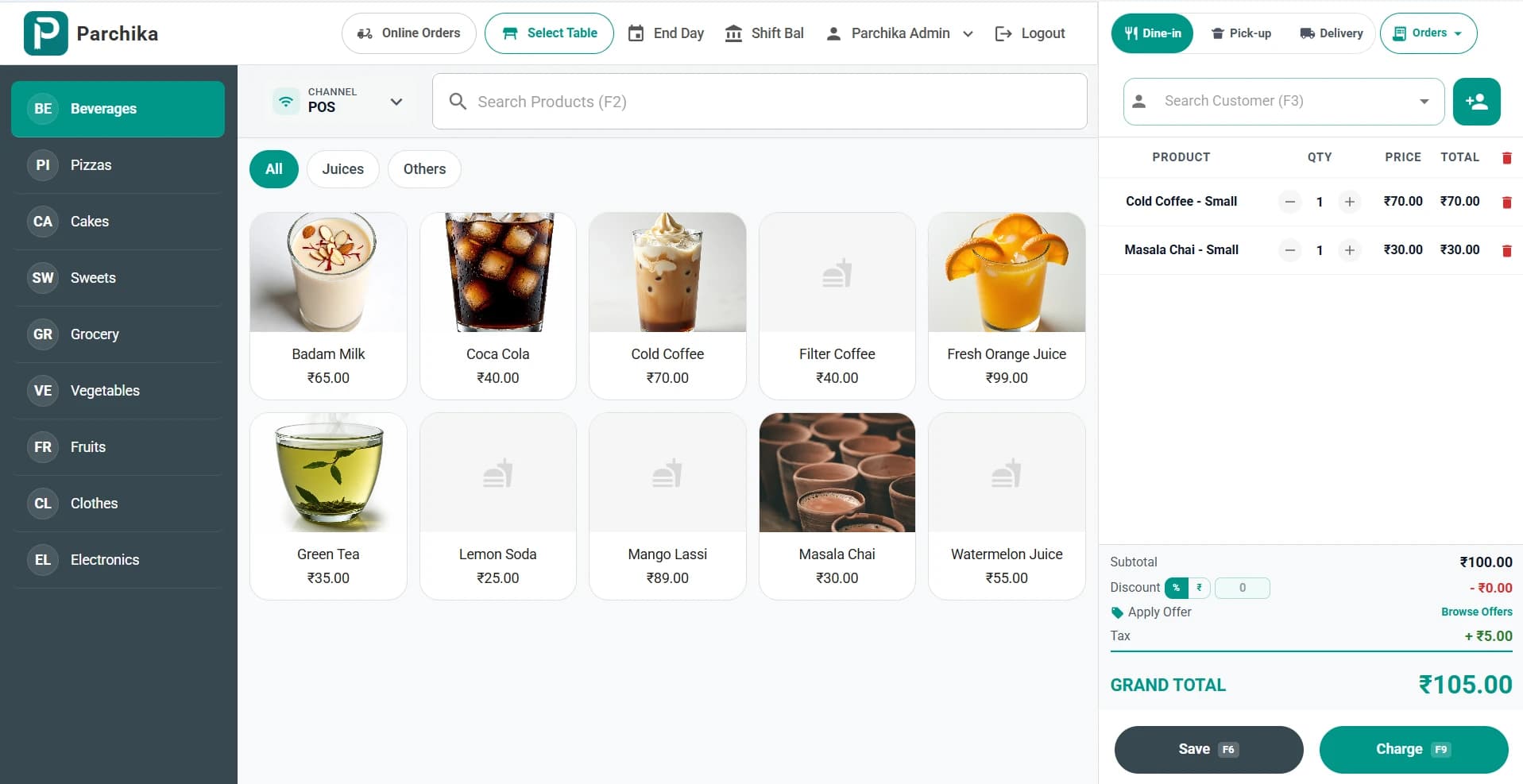
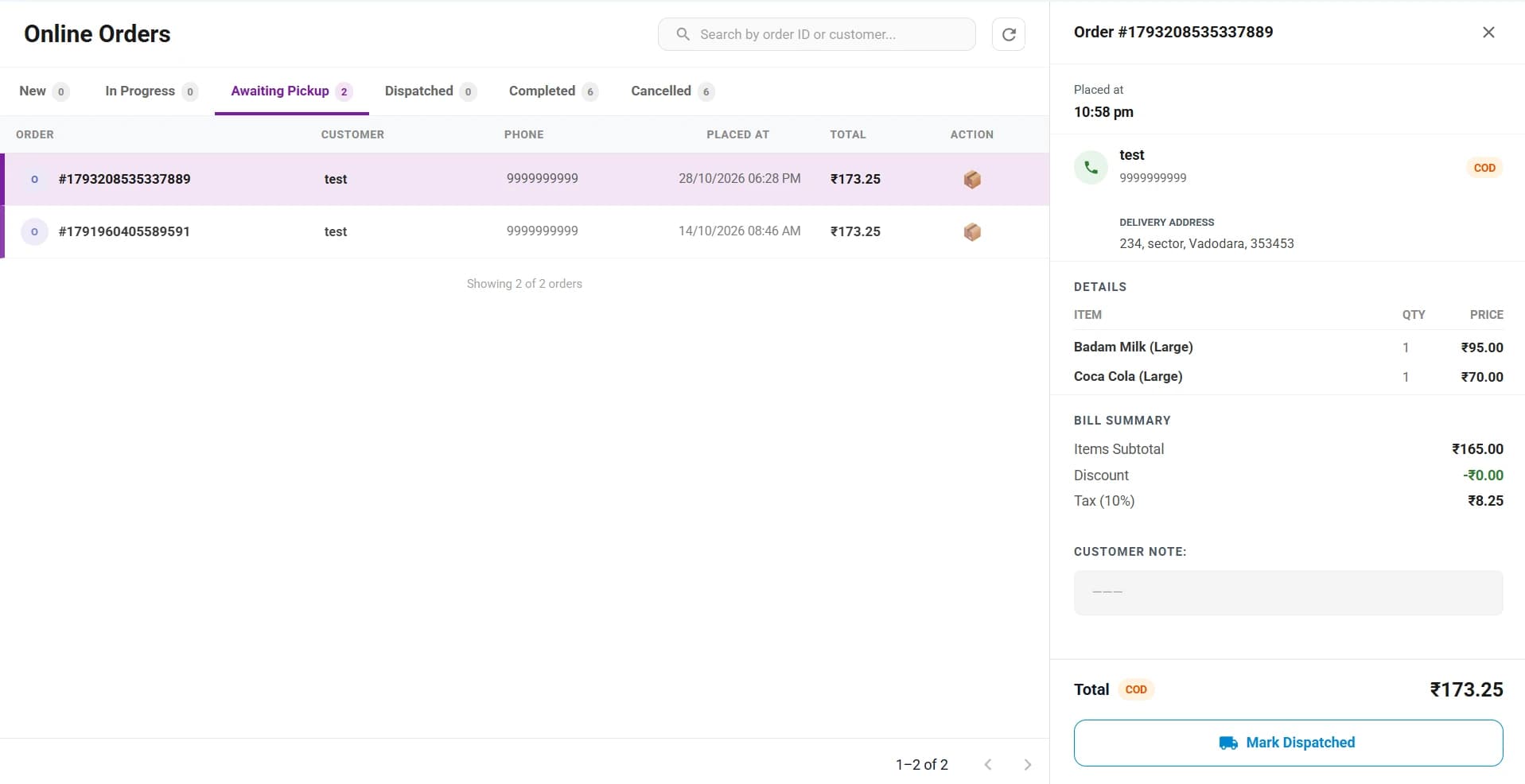
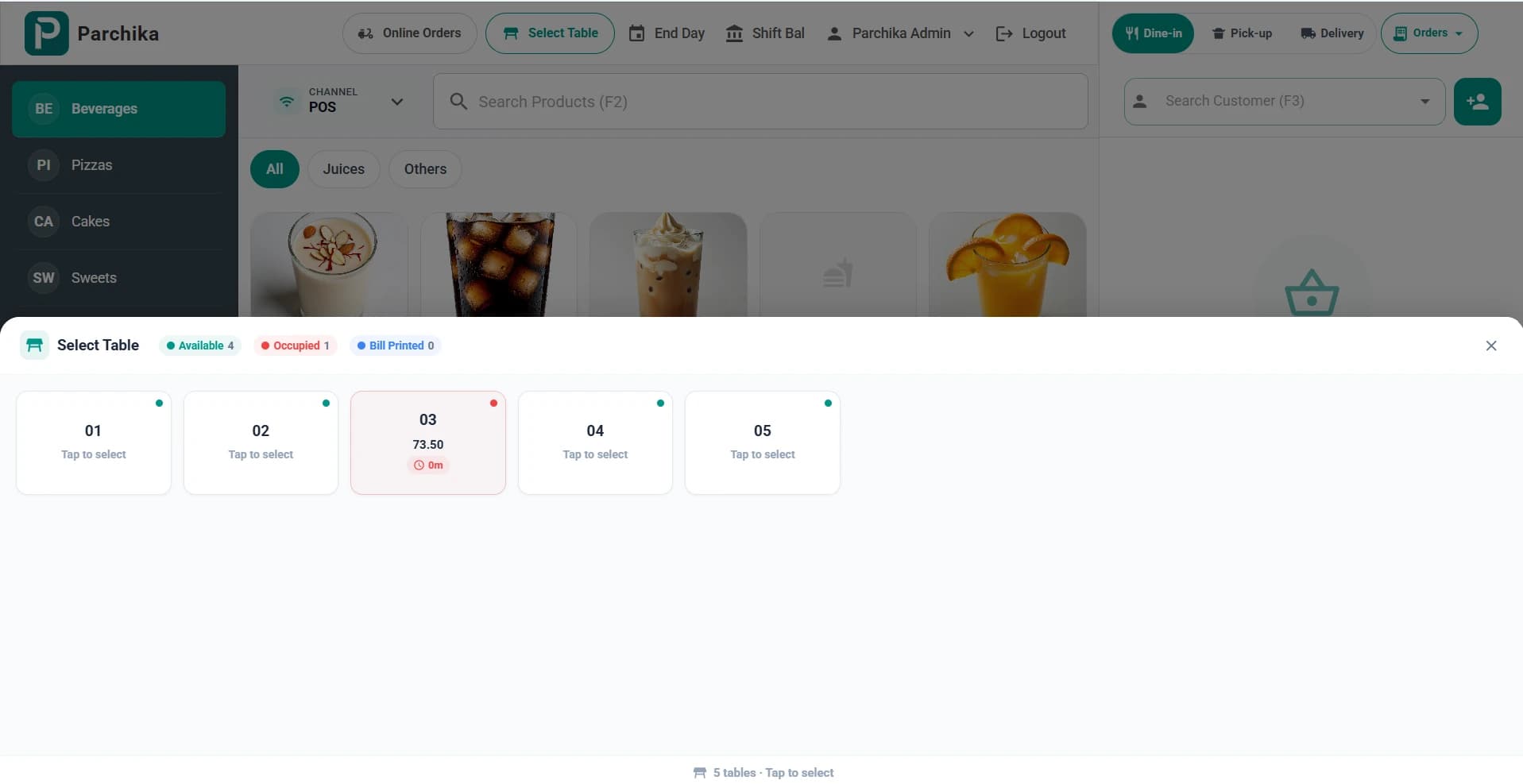
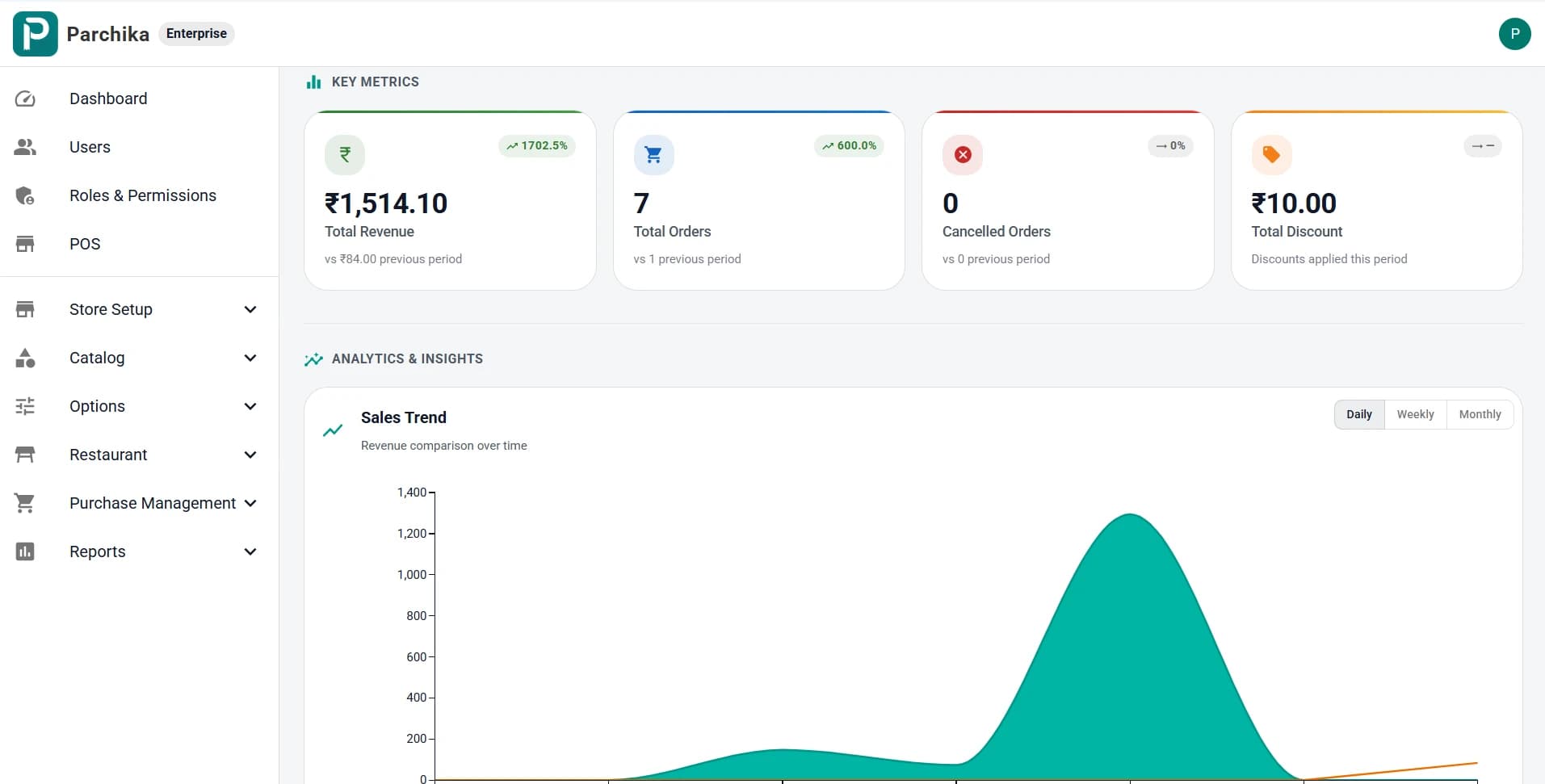
Bill drinks in a few taps: pick a category, choose the size, apply an offer and charge with F9. Tax is calculated automatically.
Why Parchika for cafe
Built to Make Your Cafe More Profitable with Smart POS
- Serve customers 2x faster with touch billing
- Eliminate modifier errors with structured customization
- Increase visit frequency with digital loyalty
- Manage walk-in, QR and online orders from one screen
- Know the cost and margin of every drink
- Track ingredient consumption to reduce waste
Perfect for
Cafe POS systems, explained
What a coffee shop POS should do, and how to choose one for your cafe.
What is a cafe POS system?
A cafe POS (point of sale) system is the software and device you use at the counter to take orders, bill customers and accept payment. A good cafe POS also handles drink modifiers, sends orders to the barista, tracks ingredients such as beans and milk, runs a loyalty programme and shows your sales, so the counter, the coffee machine and your reports all work from the same data.
What features does a coffee shop POS need?
Speed comes first: a favourites grid and one-tap modifiers for size, milk, temperature and extra shots. After that, look for a barista or kitchen display, a stamp-card loyalty programme, online and QR ordering, delivery platform orders, recipe costing per cup, offline billing and simple daily reports. Parchika includes all of these in one app.
How do I choose a POS for a small cafe?
For a single small cafe, choose a POS that is quick to set up, runs on hardware you already own and does not lock you into a long contract. Parchika runs on Android, iPad and iPhone, Windows, Mac and the web browser, and its free plan covers one outlet with 2 users, 1 device and up to 1,000 bills a month. You can move to Pro when you need inventory, recipe costing and more devices.
Cafe POS vs restaurant POS: what is the difference?
A restaurant POS is built around tables, courses and kitchen tickets. A cafe POS is built around a fast counter queue: most orders are paid upfront, drinks have many modifiers, and repeat customers matter more, so loyalty stamps and quick reorders are central. Many cafes need a little of both, which is why Parchika supports counter, table, QR and online orders in one system.
How do I calculate the cost of a cup of coffee?
Add the cost of everything in the cup: coffee beans by the gram, milk by the millilitre, syrup, sugar and the cup and lid. Divide your selling price by that cost to see your margin, and compare it with your target food cost percentage. In Parchika you set this up once as a recipe, and every sale deducts the ingredients and updates the cost when supplier prices change. Try the free food cost calculator to check a few drinks first.
Can I use a cafe POS for a cafeteria or canteen?
Yes. Office cafeterias, college canteens and food courts use the same fast counter billing, menu categories, combo pricing and daily sales reports as a cafe. Parchika's quick billing screen and offline mode suit busy lunch rushes where the line needs to keep moving.
Simple pricing
Free Cafe POS Plan — Start Today, Scale Fearlessly
No setup fee. No hidden charges. Cancel anytime.
20+ Native Integrations.
Zero Manual Work.
Parchika seamlessly connects your favorite tools and platforms to streamline orders, payments, inventory, communications, marketing, and analytics — all in real time. No third-party middleware. No duplicate data. Just seamless operations.
Delivery & Online Ordering
Receive and manage orders from all your channels in real time.
Payments
Accept every payment securely and get instant reconciliation.
eCommerce
Sync online sales and inventory across all your stores.
Customer Communication
Engage customers with automated messages and loyalty programs.
Missing an integration? Tell us what you need — our team will build it for you.
Cafe POS — FAQs
What is the best POS system for a cafe?
The best cafe POS is the one that keeps your counter fast and shows you your margins: one-tap drink modifiers, a barista display, loyalty stamps, online and QR orders, recipe costing and offline billing. Parchika covers all of these, runs on the devices you already have and has a free plan to start.
Does Parchika Cafe POS support drink modifiers?
Yes. Create unlimited modifier groups — size, temperature, milk type, sugar level, extra shots — with price adjustments per modifier.
Is there a cafe POS app for Android and iPad?
Yes. Parchika runs on Android tablets and phones, iPad and iPhone, Windows and Mac computers, and any web browser, so you can bill from the counter or from a tablet at the table.
Is there a free POS for a small cafe?
Yes. Parchika's free plan covers one outlet with 2 users, 1 device and up to 1,000 bills a month, with no credit card required. Upgrade to Pro when you need inventory, recipe costing and more devices.
Can I run a digital stamp loyalty programme?
Yes. Set up a buy-X-get-1-free stamp card. Parchika tracks stamps per customer and auto-applies the free item when the target is reached.
Can I see the cost of each coffee I sell?
Yes. Link each drink to a recipe with its beans, milk, syrup and packaging. Parchika deducts the ingredients on every sale and shows the cost and margin per item.
Does it work for click-and-collect orders?
Yes. Customers can pre-order online and receive a WhatsApp or SMS notification when their order is ready for collection.
Does the cafe POS work without internet?
Yes. Billing continues offline, and sales sync to the cloud automatically when the connection returns.
Can it handle busy rush hours?
Yes. Parchika handles 500+ transactions per hour. The touch-optimized interface is designed for speed during peak periods.
Can I manage more than one cafe?
Yes. Run several cafes or kiosks with one shared menu, push price changes to every outlet and see combined or per-outlet sales reports.
Related features
Get started today
Your first POS terminal is free. Forever.
Join 2000+ businesses running smarter with Parchika. No credit card. No setup fee. Live with 0 downtime.
Free plan includes 1 outlet · 1,000 bills a month · No credit card · Cancel anytime