Cloud Kitchen POS Software for Ghost & Dark Kitchens
Run every brand and delivery platform from one kitchen screen: aggregator and direct orders in one queue, prep-time priorities, recipe costing and brand-wise P&L.
- AI-First Platform ✦
- Free Plan — No Credit Card
- 0 Downtime Setup
- Founder-Led Support
- AI-First Platform ✦
- Free Plan — No Credit Card
- 0 Downtime Setup
- Founder-Led Support
Purpose-built for cloud kitchen
Every Feature Your Cloud Kitchen POS Needs
Parchika Cloud Kitchen POS manages multiple food brands, aggregator platforms (Zomato, Swiggy, Uber Eats, DoorDash) and your own online orders from a single screen. Orders join one kitchen queue sorted by delivery time and prep time, ingredients are deducted by recipe, and every brand gets its own P&L. Built for cloud kitchens, ghost kitchens and dark kitchens.
Multi-Brand Management
Run 10+ brands from one kitchen with separate menus and reporting.
Aggregator Integration
All Uber Eats, Zomato, DoorDash and Swiggy orders in one queue.
Production Queue
Unified kitchen queue prioritized by delivery time and prep time.
Brand Analytics
Revenue, orders, ratings and top items per brand in real time.
Menu Sync
Update menu across all platforms simultaneously from one place.
Packaging Management
Track packaging costs per order and allocate to brand P&L.
Direct Online Ordering
A commission-free ordering page for each brand, with orders landing in the same kitchen queue as aggregator orders.
Kitchen Display with Prep Timers
One kitchen screen shows every brand's orders with prep timers, so the line knows what to cook next.
Recipe Costing & Stock
Each dish deducts its ingredients on sale, so stock stays accurate across all brands and food cost is known per dish.
Central Kitchen Supply
Make gravies, bases and marinades in a central kitchen and transfer them to each cloud kitchen with batch and expiry.
Multi-Location Control
Run several cloud kitchen locations with shared brand menus and combined or per-location reports.
See it in action
See Parchika Cloud Kitchen POS in Action
Real screens from the Parchika app, not mockups.
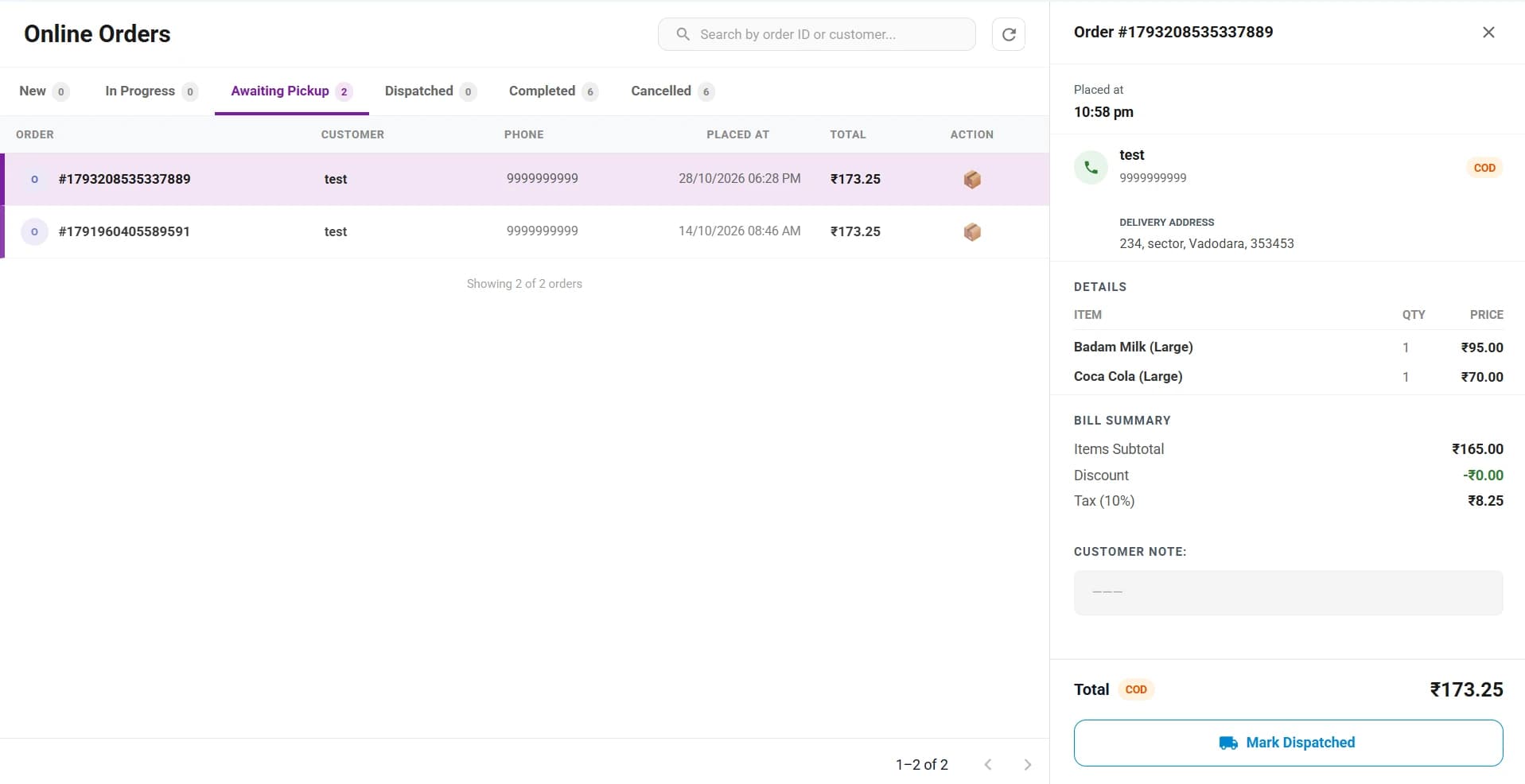
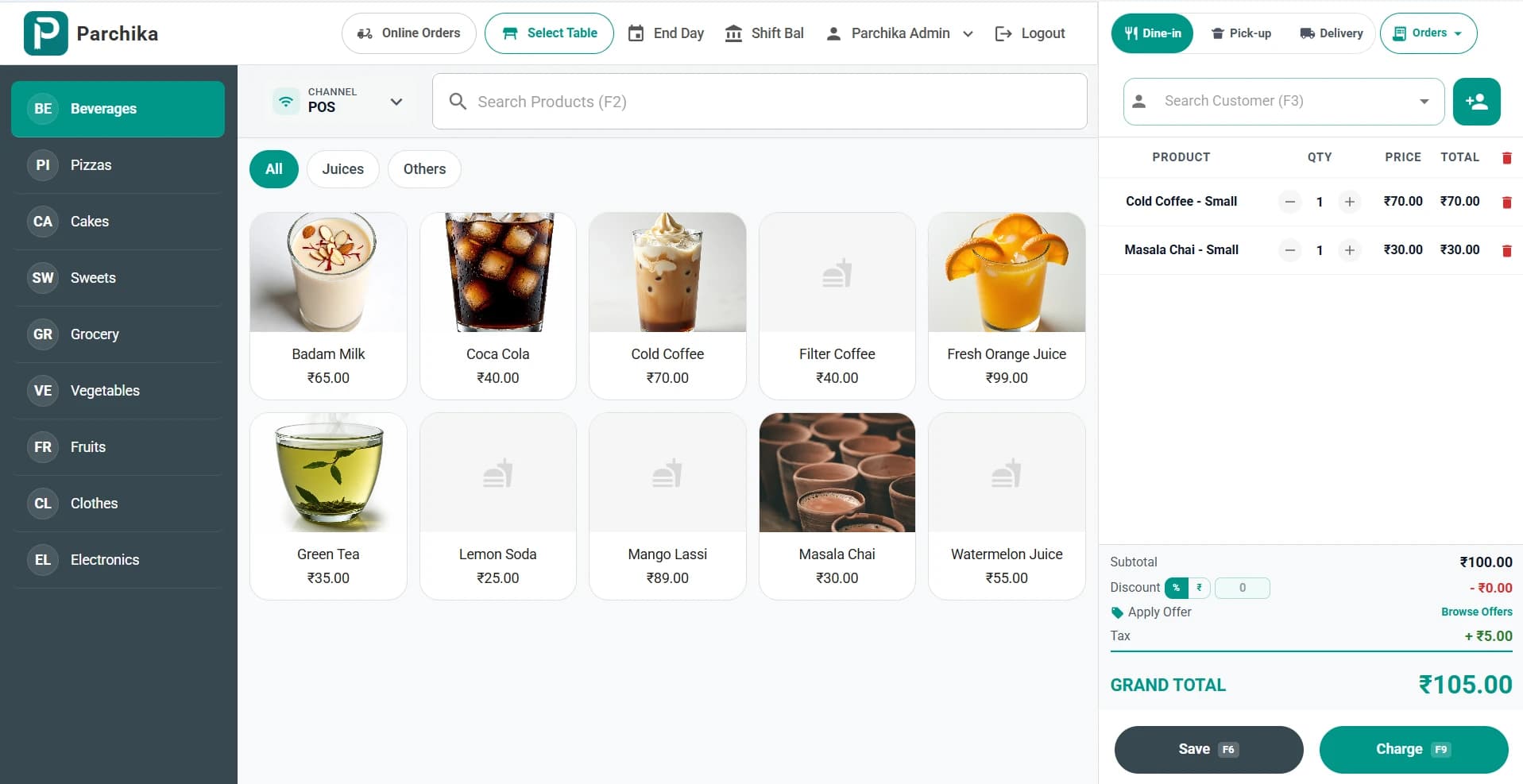
Every delivery and pickup order in one queue, from new to dispatched, with customer details, delivery address and the bill summary.
Why Parchika for cloud kitchen
Built to Make Your Cloud Kitchen More Profitable with Smart POS
- Run 10+ brands from one kitchen
- Reduce aggregator error rate by 95%
- Prioritize orders by delivery window automatically
- Track brand-wise P&L in real time
- Update all menus with one click
- Know the food cost of every dish on every brand
Perfect for
Cloud kitchen POS, explained
How cloud, ghost and dark kitchens run orders, brands and costs, and what their POS needs to handle.
What is cloud kitchen POS software?
Cloud kitchen POS software takes orders from delivery platforms and your own ordering page, sends them to the kitchen, tracks ingredients and reports sales, for a kitchen that sells only for delivery or pickup. Unlike a restaurant POS, it is built around several brands sharing one kitchen and orders arriving from many channels at once.
Cloud kitchen vs ghost kitchen vs dark kitchen
They mean the same thing: a delivery-only kitchen with no dining room. "Cloud kitchen" is the common term in India and the Middle East, "ghost kitchen" in the US, and "dark kitchen" in the UK and Europe. A virtual brand is a menu sold only online, often several of them from the same kitchen.
What POS software works best for a ghost kitchen?
Look for five things: every delivery platform and your own ordering page in one order queue, separate menus and pricing per brand, a kitchen display that prioritises by delivery time and prep time, recipe-based stock deduction shared across brands, and P&L per brand including packaging and platform commission. Parchika covers all five in one system.
How are preparation times handled across brands?
Each dish has an estimated prep time. When orders arrive from different brands and platforms, Parchika combines them into one kitchen queue sorted by delivery time and prep time, so a slow dish for one brand starts before a quick dish for another and both are ready when the rider arrives.
How do dark kitchens get analytics across brands and channels?
Because every order, whichever brand or platform it came from, is recorded in the same POS, Parchika can report revenue, orders, top items and gross profit by brand, by channel and by location. That shows which brand to push, which platform is worth its commission and which dishes lose money.
How fast can I launch a new virtual brand?
If the kitchen and ingredients are already set up, a new brand is mostly menu work: create the brand, add its menu and recipes using existing ingredients, set prices, and map it to your delivery platform listings. Orders then flow into the same kitchen queue and stock. Platform approval times vary, so plan for that separately.
Cloud kitchen vs central kitchen
A cloud kitchen cooks finished meals and sells them to customers for delivery. A central kitchen prepares bases, gravies and semi-finished items for other outlets. Groups often run both: a central kitchen supplying several cloud kitchens, which Parchika handles with requisitions and batch transfers.
Simple pricing
Free Cloud Kitchen POS Plan — Start Today, Scale Fearlessly
No setup fee. No hidden charges. Cancel anytime.
20+ Native Integrations.
Zero Manual Work.
Parchika seamlessly connects your favorite tools and platforms to streamline orders, payments, inventory, communications, marketing, and analytics — all in real time. No third-party middleware. No duplicate data. Just seamless operations.
Delivery & Online Ordering
Receive and manage orders from all your channels in real time.
Payments
Accept every payment securely and get instant reconciliation.
eCommerce
Sync online sales and inventory across all your stores.
Customer Communication
Engage customers with automated messages and loyalty programs.
Missing an integration? Tell us what you need — our team will build it for you.
Cloud Kitchen POS — FAQs
What is the best POS for a cloud kitchen?
The best cloud kitchen POS puts every platform and brand into one order queue, prioritises the kitchen by delivery and prep time, deducts stock by recipe across brands, and shows P&L per brand. Parchika does all of this in one system, with Zomato, Swiggy, Uber Eats and DoorDash orders alongside your own online orders.
Can Parchika manage multiple food brands in one kitchen?
Yes. Run unlimited food brands from one kitchen, each with its own menu, pricing and branding — all managed from a single dashboard.
Which delivery platforms does it integrate with?
Parchika integrates with Uber Eats, DoorDash, Zomato, Swiggy, Talabat, Deliveroo and other platforms (20+ integrations in total), with automatic order injection.
Is there a cloud kitchen POS for India?
Yes. Parchika takes Zomato and Swiggy orders straight into the POS, accepts UPI, prints GST-ready bills and runs multiple brands from one kitchen.
How does the production queue work?
All orders from all platforms are combined into a single kitchen queue, sorted by delivery time and estimated prep time so nothing falls through.
Can I take direct orders without aggregator commission?
Yes. Each brand can have its own online ordering page. Direct orders arrive in the same kitchen queue as aggregator orders, without a platform commission.
Can I track P&L per brand?
Yes. Parchika tracks revenue, COGS, packaging costs and gross profit per brand, per day, per week or per month.
Can a central kitchen supply my cloud kitchens?
Yes. Parchika's central kitchen module combines requisitions from each cloud kitchen into one production plan and transfers batches with expiry date and cost.
Related features
Get started today
Your first POS terminal is free. Forever.
Join 2000+ businesses running smarter with Parchika. No credit card. No setup fee. Live with 0 downtime.
Free plan includes 1 outlet · 1,000 bills a month · No credit card · Cancel anytime