
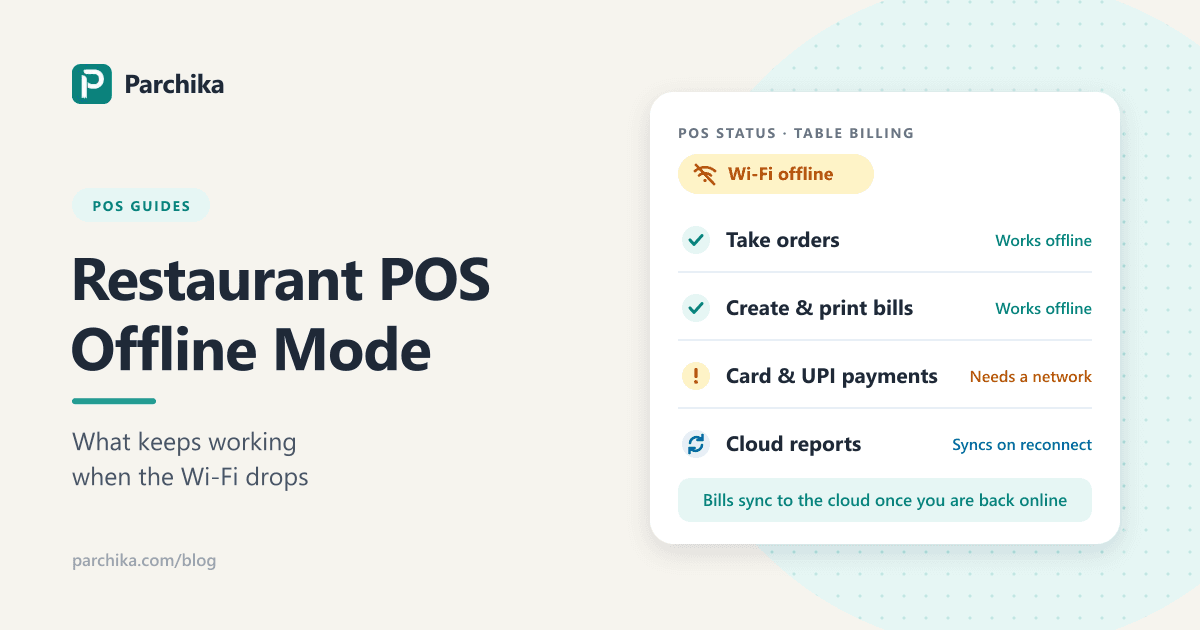
A practical checklist for restaurant POS software, offline billing, kitchen tickets, payments, and syncing.
View POS PlansA restaurant POS system can seem reliable during normal service and still leave important questions unanswered when the internet drops. Can staff keep entering orders? Will kitchen tickets reach the right station? Can customers pay by card, or only with cash? What happens to sales after the connection returns?
“Offline POS” does not always mean every feature works offline. A system may let staff continue taking orders while card processing, delivery integrations, cloud reports, or multi-device syncing are unavailable. The exact behavior depends on the software, hardware, payment provider, settings, and outage type.
Before choosing restaurant POS software or restaurant billing software, ask the provider to demonstrate an outage workflow. Use this guide to test the system and prepare your team.
What does offline mode mean in a restaurant POS?
Offline mode is a backup state that lets some POS functions continue when a device cannot reach the internet or the provider’s cloud service. The POS may use information already stored on the device or local network, then sync activity after the connection returns.
An internet outage, a failed local router, and a POS provider service interruption are different problems. They can affect the till, kitchen screens, printers, card terminals, and online orders in different ways.
Quick answer: Offline mode may keep order entry working, but it does not guarantee that every payment type, integration, report, or connected device will work. Ask what remains available and test it before relying on the system.
What may stop during an internet outage?
Depending on the restaurant POS system, network, and hardware, an outage may affect:
- Cloud access: Back-office settings, remote dashboards, and reports may need an internet connection.
- Connected devices: Terminals, kitchen displays, printers, and handhelds may rely on the local network, the internet, or both.
- Online orders: Website or delivery orders may not reach your POS while disconnected.
- Integrated payments: A card terminal may need a connection even if the POS can record an order.
- Automatic syncing: Locally saved activity may need to upload later; ask what happens if a device restarts.
Do not assume “offline billing” means “offline card payments.” These are separate capabilities. Some providers allow offline card transactions only after the feature is enabled and only on supported devices. Check limits and risks for your provider, payment type, device, and country.
Offline orders and offline payments are different
Order entry records a customer’s items and sends them to preparation. Payment processing authorizes and completes the payment. One may continue while the other is unavailable.
During a demo, ask the provider to show a dine-in order during a simulated internet interruption. Can the cashier add items? Does the kitchen receive the ticket? Can the bill print? Then test cash, card, contactless, QR payment, and other methods separately. One successful offline example does not prove that all payment types work.
For card payments, ask whether transactions are authorized immediately or stored for later processing. Find out what happens if a transaction is declined after reconnection, how long the device can remain offline, and who reviews pending payments.
Restaurant POS outage checklist
Ask these questions when comparing restaurant POS systems, restaurant billing software, or a free POS plan:
- What keeps working? Get the offline feature list for your plan, device, and operating system.
- Can staff sign in? Check whether they can start a shift if a device has not synced recently.
- Can the team manage orders? Test modifiers, notes, discounts, split bills, and cancellations.
- Do kitchen tickets arrive? Test each display, printer, and station.
- Can you print a bill? Confirm receipt printing and the backup process.
- Which payments are possible? Ask about cash, card, contactless, QR, gift cards, and terminals separately.
- What are the limits? Check transaction caps, time limits, supported devices, and setup steps.
- What happens to online orders? Ask how website and delivery orders behave during the outage.
- How does syncing work? Learn what uploads automatically and how duplicates are handled.
- Can managers reconcile? Confirm how to check cash and pending transactions at shift end.
Test the restaurant POS during a demo
Ask the vendor to demonstrate the workflow on the device you plan to use. Include the person who takes orders and the person who closes the shift. Try a dine-in order with two items, a modifier, a kitchen note, and a split bill.
Interrupt the internet before order entry, after sending the ticket, while printing the bill, at payment, and after reconnection. Record which steps work, which transactions remain pending, and whether staff need to repeat any work. Ask how a manager can identify offline activity afterward.
Prepare a simple staff plan
Keep a short outage plan near the till or in the staff handbook. Include who checks the connection, which backup network staff may use, how to record orders if devices stop, which payments may be accepted, who checks for duplicate orders, and who reconciles pending transactions.
For example, a restaurant might use pre-numbered order slips during a full outage, then have a manager compare them with the POS after service. This is an illustrative process; choose a method that fits your operations and local rules.
Compare free POS software plan limits
A free POS software plan can help a small restaurant or café get started, but check outlets, users, devices, monthly transactions, report history, and support. Also check whether inventory, integrations, hardware, or payment processing cost extra.
Parchika’s India pricing page currently lists its Free plan at ₹0 for one outlet, two users, one device, and up to 1,000 sales orders a month, with sales reports for up to six months. Terms can differ by region and change over time, so confirm current details for your business.
Ask the same offline questions about a free restaurant POS as you would about a paid plan. Confirm which devices and features are included, then test the workflow your team expects to use.
Common offline POS mistakes to avoid
Assuming offline mode includes card payments
Ask about order entry and each payment method separately. Offline payment processing may require advance setup and may have limits.
Testing only the cashier screen
Test the full route from order entry to kitchen preparation and bill settlement.
Forgetting to reconcile after reconnecting
Check that pending orders and payments have synced and manual records are not duplicated.
Frequently asked questions
Can a restaurant POS system work without internet?
Some systems keep selected functions available offline, such as order entry or local kitchen ticketing. Available functions vary by provider, device, plan, and network. Confirm them in a live test.
Can I accept card payments when my POS is offline?
It depends on the POS provider, payment processor, hardware, payment type, and settings. Offline transactions may be stored for later and can be declined. Ask about limits and pending-payment checks.
How can Parchika help when the internet drops?
Parchika’s website says billing can continue when the internet drops and data syncs after the connection returns. The exact behavior can depend on your device and setup. Ask the Parchika team to demonstrate the order, billing, and payment steps your outlet needs before relying on offline mode.
Choose a POS system you have tested offline
Restaurant POS offline mode is not one on-or-off feature. Order entry, kitchen tickets, receipts, payments, integrations, and syncing can behave differently during an outage. Compare restaurant POS software by testing the workflow your team depends on and recording exactly what remains available.
If you are considering Parchika, review the current Parchika POS plans and ask for a demonstration using your service flow and devices. Confirm the offline functions, supported devices, and payment behavior for your country and plan.
Looking for a POS for your restaurant?
Discuss your team’s workflow and the features you are evaluating. Ask about offline billing and the setup for your outlet.
This article provides general operational guidance. Confirm offline functions and payment terms for your specific provider, device, and country before making a decision.
Written by
Parchika Editorial
POS Software Experts
The Parchika team of restaurant and retail technology specialists fact-checks and curates industry best practices.